All postsSHORT3 min read
YouTube Can Make Shorts of You Without You: The AI Avatar
YouTube can build an AI avatar of your face and voice from one selfie and use it in Shorts. How it works, the rules, and a service idea.
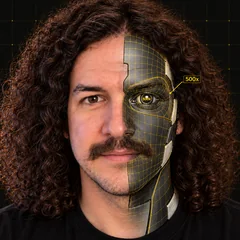
YouTube can make videos of you without you. Record one selfie, read a few lines, and it builds an AI avatar with your face and your voice. Type a prompt, and your avatar stars in the Short.
What happened
YouTube rolled out AI avatars for Shorts in April 2026. 9to5Google covered the launch on April 8, and the feature works like this:
- Setup. You record a "live selfie" of your face and voice while reading a few prompts. It's in the main YouTube app and in YouTube Create. You do it once, and you can retake it if your look changes.
- Creating. You type a prompt and your avatar appears in the clip. Each generation runs up to 8 seconds, and you can make several clips back to back.
- Voice. The avatar looks and sounds like you.
- Where to find it. In the Create "+" menu, tap the Gemini spark, choose "Create video," then "Make a video with my avatar." Or go through Remix, then Reimagine, then "Add me to this scene."
The rules are worth knowing:
- You have to be 18 or older and have an existing YouTube channel.
- At launch it rolled out globally, excluding Europe.
- Every avatar video gets watermarks and digital labels, including SynthID and C2PA, plus AI-content disclosures.
- No one else can use your avatar to make original Shorts.
- You can delete your avatar anytime, and YouTube deletes it automatically after three years without use. Videos you already made with it stay up until you delete them.
Why it matters for builders
In my experience, the hardest part of short-form video for most people is showing up on camera every day. Lighting, retakes, the awkwardness of talking to a phone. An avatar that looks and sounds like you removes the filming step for a lot of simple formats: tips, announcements, quick explainers.
The labeling is a feature here. Every clip is marked as AI, so viewers know what they're watching. That keeps it honest, and it means the content has to earn attention with a good hook and a useful message. The novelty alone won't carry it.
The 8-second limit shapes the format. You're writing in short beats that chain together, which is a good discipline for Shorts anyway.
Try it in 15 minutes
- Open the YouTube app on your phone, signed in to a channel you own.
- Tap the Create "+" button, tap the Gemini spark, choose "Create video," and pick "Make a video with my avatar."
- Record the live selfie in good light and read the prompts clearly. This is what your avatar is built from, so take your time.
- Write a 30-second script as four beats of about 8 seconds each. Open with the hook in the first line.
- Generate each beat as its own clip with a short prompt, then line them up back to back.
- Before you post, watch it with the sound off and then with the sound on. If either version loses you in the first two seconds, rewrite the hook.
Here's how you get paid
Here's my opinion. Most local business owners will never film themselves every day. They know they should be on Shorts. They don't have the time or the stomach for it.
So set up their AI avatar, write the scripts, and run their Shorts for a monthly fee. A dentist answering one common question a day. A realtor walking through one neighborhood fact a day. A gym owner with one form tip a day.
A few things I'd build into the offer from day one:
- Consent and control stay with the owner. The avatar belongs to their account, so they record the selfie themselves, and nobody else can use it. Before you promise to post for them, check what YouTube currently lets a channel manager do with the owner's avatar, and set up access through YouTube's own channel permissions.
- Scripts are the product. Anyone can press generate. You're selling a month of good hooks, accurate claims and a consistent voice.
- Labels stay on. YouTube labels every avatar clip. Tell clients that up front so nobody is surprised.
Daily email
Get each breakdown in your inbox.
One email each evening, right after the Short goes live: the AI tool it covers, the full write-up with sources, and how to get paid for it. Free, and you can unsubscribe anytime.
Sources
- 9to5Google, "YouTube Shorts AI avatar" (April 8, 2026): https://9to5google.com/2026/04/08/youtube-shorts-ai-avatar/